Olde runs any open model across your computers, and trains new ones with them. Two machines or two hundred, at home, in one office or spread across cities, and they work as one. No cloud bill, and your data stays on your machines.
Speed
Olde does not have a speed of its own. It has your machines. Every machine you add brings its memory and its processors, and Olde shares the work out so nothing sits idle.
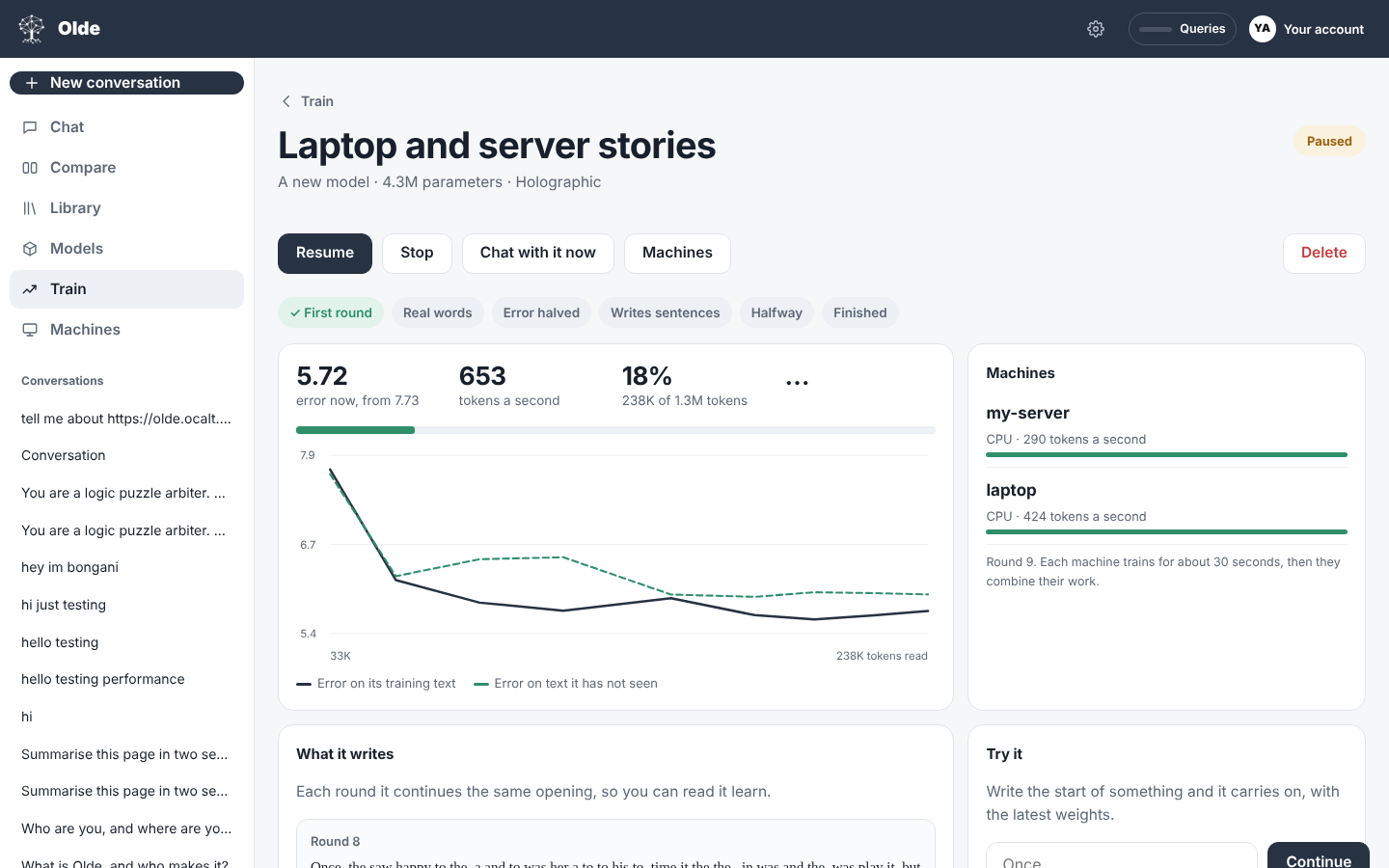
Before you install, the plan shows how fast your machines should be and how long training will take, worked out from the machines you picked.
Three ways to share the work
Olde shows which modes your machines can use, so you never have to guess.
Every machine holds the whole model, at the size it has room for, and they vote on every word. Machines can be anywhere: home, office, a server in another city.
The same voting, but the machines talk only over their own local network. Nothing crosses the internet between them, so it is much faster.
The model's layers are divided between machines on one network, so their memory adds up. Together they run a model none of them could hold alone, even one of 100 billion parameters and more.
New: Train
Every machine trains on its own share of your data at the same time, graphics card and all, and Olde combines their work every round. Add a machine and it joins at the next round. The size you can build is set by your machines, not by Olde.
Start from a published model and teach it your business, your writing or your field. Olde trains small add-on weights (LoRA) so ordinary computers can improve big models, or every weight when you have the machines.
Olde learns a vocabulary from your data and trains a conventional language model of the size you choose: from a few million parameters on one laptop to the scale of the largest models, planned honestly against your fleet.
Everything in Olde
Olde keeps its own model library and its own runtimes. It needs nothing else installed, and uses models you already have when it finds them.
Search Hugging Face or paste any GGUF model or link. Olde checks what fits on each machine and tells you honestly, but never blocks you.
Name the machines you use together, like Office or Home, and pick the whole group in one click. Your Ocalt Clusters appear as groups too.
Good models by job: small and fast, everyday chat, code, reasoning, many languages, and large, plus what is popular this week.
Ask several models, or one model in two modes, the same question and watch them answer side by side with their speed.
Attach documents, spreadsheets, code and pictures by upload, drag and drop or paste. Vision models see pictures; for the rest Olde reads their text.
Press the microphone and speak. Your browser listens, or Olde transcribes on Ocalt when it cannot.
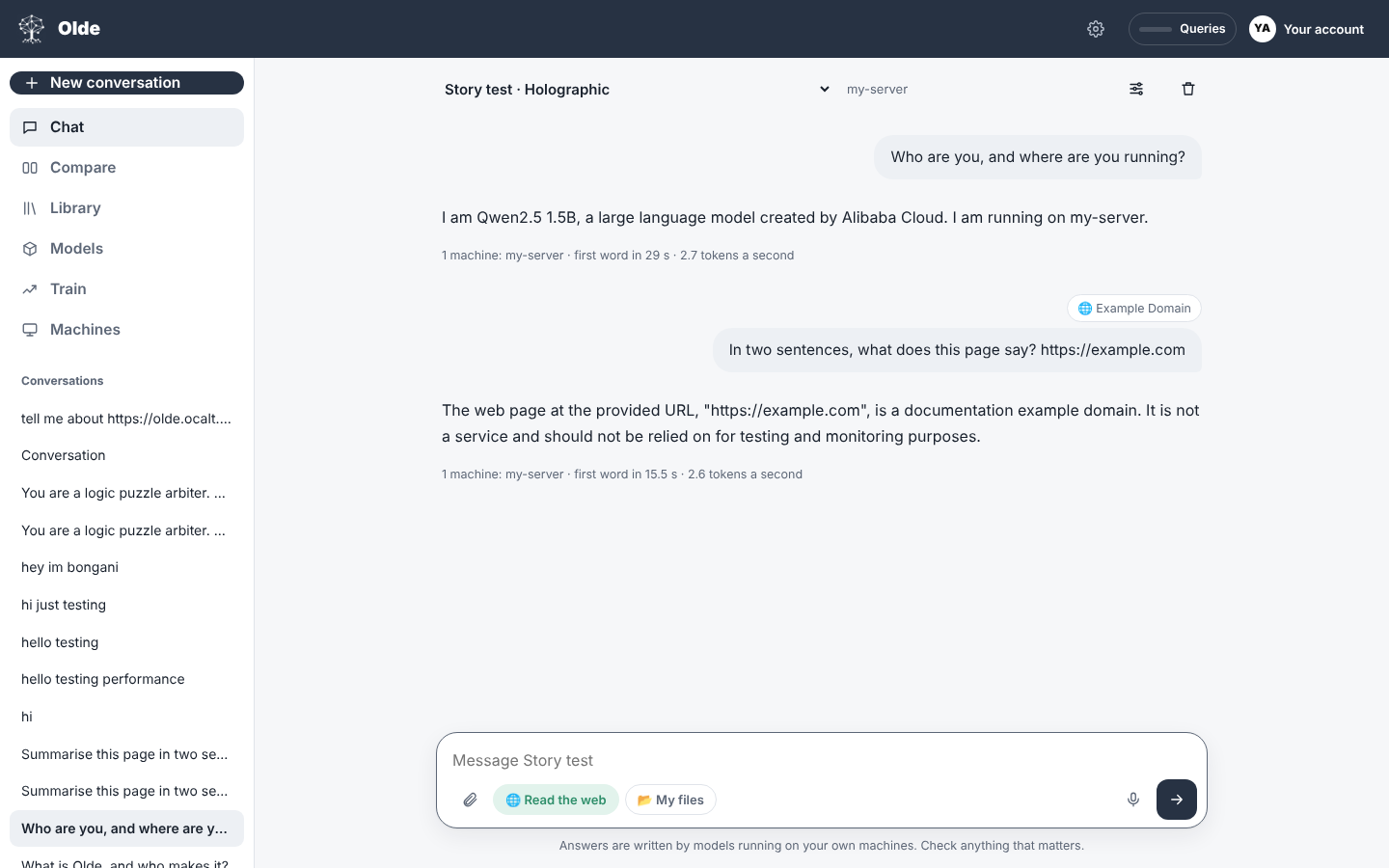
Paste a link and Olde reads the page for the model, showing you the source. Turn it off for any conversation.
Attach from Root, Mounted or any drive of your machines. Allow a conversation and the model can open your files, and save to them after you confirm.
Instructions for every model, each model, or one conversation, with creativity, word choice, answer length and memory, all explained in plain words.
Chat with any model you run. Under every answer: which machines wrote it, how fast, and how often they agreed.
What you could build
Olde grows with the machines you give it. A few ideas of what that looks like.
Twenty office desktops, idle after hours, pool their memory with Local Split and run a 70B model nobody's single computer could hold. The whole team chats with it in the morning.
Thirty computer-lab PCs train a model from scratch over a weekend on stories and lessons in isiZulu, then the class talks to the model they built.
Four workstations with graphics cards improve an open model on years of the studio's own briefs and copy, and it writes in their voice from then on.
Three old laptops and a gaming PC become one private assistant for the house. Homework, recipes and letters never leave home.
Servers in Johannesburg, Cape Town and Durban hold the same model with Holographic and vote on every answer, so it keeps working when one city goes offline.
A hundred machines across a university, graphics cards and all, train a new model for their field, sized to what the whole fleet can hold.
How it works
Install the Ocalt client on each computer you want to use. Windows and Linux both work, with or without a graphics card.
From the library, a search, or a link to any GGUF model. Or start Train and build your own.
Tick machines or a group. Olde shows what each will hold and how the work is shared, then installs everything.
Chat, attach files, speak, paste links, and compare. Every answer shows which machines answered and how fast.
Private by design
The model runs on computers you own. Conversations are kept in your Ocalt account, and nothing is used to train anyone else's model.
Questions
Olde is software by Ocalt that runs open AI language models across the computers you own, and trains new models with them. You chat with the models in your browser, from any device.
No. Olde runs on ordinary processors. A graphics card (NVIDIA, AMD or Apple chips) makes running and training faster, and Olde uses one when a machine has it.
Any open model published as GGUF files, such as Qwen, Llama, Mistral, Gemma and Phi, at any size your machines can hold together. Search Hugging Face from inside Olde, paste a link, or pick a .gguf file from your own storage.
With Local Split, your machines' memory adds up, so a group of ordinary computers can run a model none of them could hold alone, including models of 70 billion parameters and more. Olde shows an honest plan before anything is installed.
Holographic: every machine holds the whole model and they vote on each word, wherever they are. Holographic Local: the same voting, kept on one local network, so it is much faster. Local Split: the model's layers are shared across machines on one network, so their memory adds up.
Yes. Improve an existing model on your own material, or create a new language model from scratch. Every machine trains on its share of the data and Olde combines their work each round. The size you can build is set by your machines.
Models run on your machines. Conversations are kept in your Ocalt account. Training data goes only to the machines you chose. A model reads your files only in conversations where you allow it.
An Ocalt account, the free Ocalt client on each computer (Windows or Linux), and Python, which Olde installs for you if it is missing.
Yes. Paste a link and Olde reads the page for the model, showing you the source. Attach documents and pictures; vision models see pictures, and the rest read their text.
No. Olde coordinates your own machines. There is no cloud bill for the AI itself, because your computers do the work.
Windows 10 and 11, and Linux (x86-64), with or without a graphics card. Chat from any modern browser, on a computer or a phone.
Any GGUF model: Qwen, Llama, Mistral, Gemma, Phi, DeepSeek and more, from 0.5B to 100B parameters and beyond.
Uses your Ocalt account, your Ocalt storage, your machine groups from Ocalt Clusters, and the Ocalt client on each machine.
Open Olde, add a model, and have your first answer in minutes. Then train one that is entirely yours.
 Olde